Chaotic

Stop managing agents. Start designing their world.

A CLI-native issue tracker with enforced budgets and ritual checkpoints.
You define the physics. They learn the rules.

The Agent Runaway

AI coding agents have no brakes. They'll burn your token budget, ignore your architecture, and close 20 tickets in a loop without stopping to think.

Jira and Linear are human-first. Agents are guests in our world. In their world, they need physics.

agent.sh
$ chaotic issue move CHT-001 done
Issue CHT-001 moved to Done.
$ chaotic issue move CHT-002 done
Issue CHT-002 moved to Done.
$ chaotic issue move CHT-003 done
Issue CHT-003 moved to Done.
... 17 more tickets ...
$ chaotic issue move CHT-021 done

The Insight

You don't tell a toddler "don't fall down the stairs" 500 times.
You put a gate in front of the stairs.

Chaotic applies this to AI. The agent just uses a CLI. Sometimes commands succeed. Sometimes they fail with hard errors. The agent adapts to the world you've built.

Core Mechanics

1. Rituals

Rituals are checkpoints you define. They can trigger on sprint close, ticket claim, or ticket close:

  • Run the test suite
  • Attest documentation is current
  • Request an oppositional code review
  • File a design spec with the alternatives you considered
  • Reflect on what went well this sprint and vent about what frustrated you

Until rituals complete, the action is blocked. The pause is the point.

2. Sprints & Limbo

Sprints have point budgets. Exceed it, and the project enters Arrears. Close a sprint, and it enters Limbo until rituals clear.

PointsSpent > Budget ⇒ State: Arrears

The CLI blocks work until the constraint clears. Not a suggestion. A wall.

3. Human Gates

You set the autonomy level for each ritual.

Auto: Agent attests, work continues.
Review: Agent attests, you click Approve.
Gate: You do the ritual yourself.

How It Works

The CLI (chaotic)

Optimized for agents.

  • Structured errors
  • Predictable behavior
  • Copy-pasteable remedies

The Dashboard

Optimized for humans.

  • Set budgets & rules
  • Approve rituals
  • Watch it all happen

The Dashboard, For Real

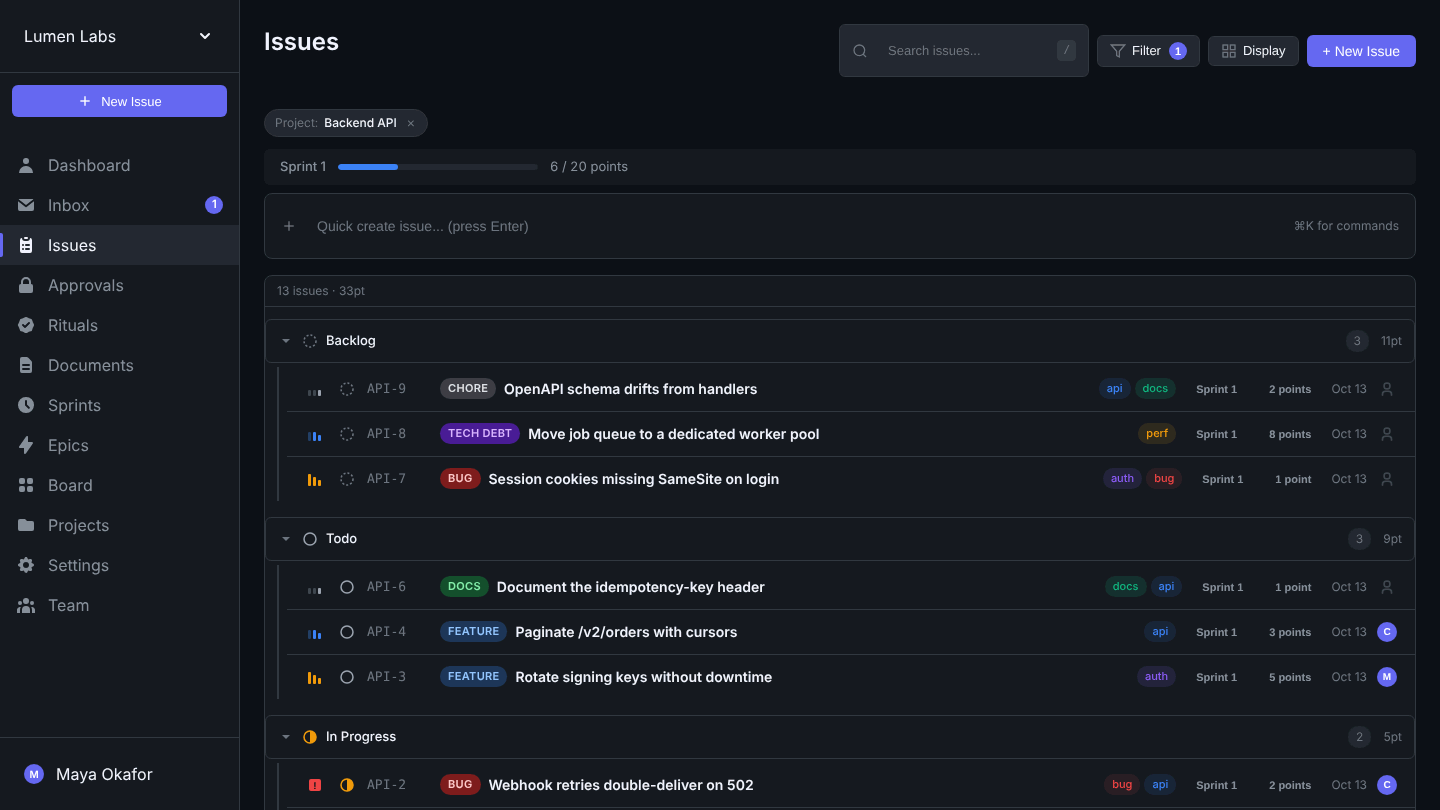
Not a mockup. This is the web UI that ships with Chaotic, watching an agent work through a sprint. (The team and tickets are made up.)

Chaotic issues view: a Backend API project grouped by status, with a sprint progress bar showing 6 of 20 points spent
Issues, grouped by status, with the sprint's point budget up top.
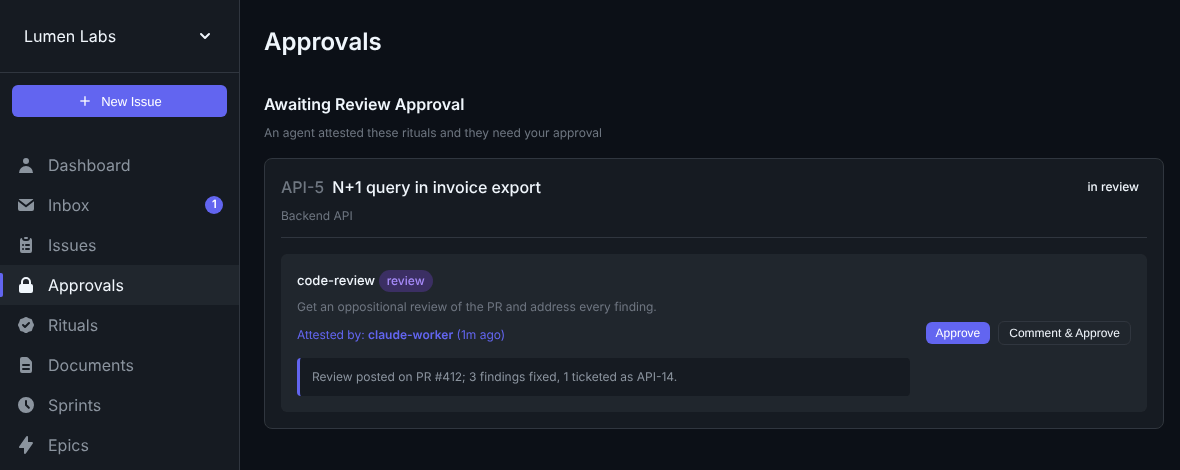
Approvals view: an agent attested the code-review ritual on a ticket, and it waits for a human to approve
An agent attested a review ritual. The ticket can't close until you approve.
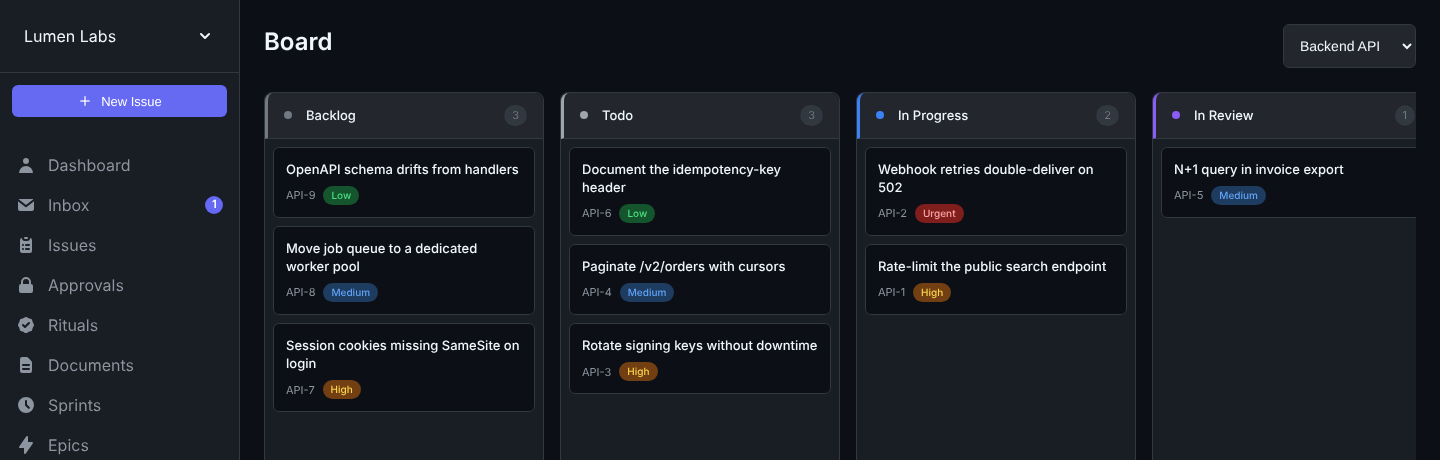
Board view with Backlog, Todo, In Progress and In Review columns
The board, for when you'd rather see columns.

On your phone: Chaotic for Android No public build yet

A native app for the human side: your inbox, issues and sprints, readable offline. Approve or reject a gate with a swipe, or straight from the notification on the lock screen. Push arrives through UnifiedPush (for example ntfy), so it needs no Google Play Services. You sign in as yourself, never as an agent.

The code is open on main, but there is no build to install yet. It is planned as an APK you sideload or follow with Obtainium; it is not planned for Google Play. It signs in through the server's OAuth, so it needs a server newer than 0.1.0a21 with OAUTH_ENABLED on.

Agents & MCP

Agents can shell out to the CLI, or use Chaotic as native tools over the Model Context Protocol. Either way they get the same budgets, rituals and gates.

Local: chaotic mcp

An MCP server over stdio for any harness on the same machine, such as Claude Code. It reuses the CLI's login and profile, so there is no separate MCP sign-in.

claude mcp add chaotic -- chaotic mcp

# several agents on one machine? pin a profile
claude mcp add chaotic -- chaotic --profile myprofile mcp

Any MCP host that takes a JSON config works the same way: command chaotic, args ["mcp"].

Remote: add by URL Coming soon

The server speaks MCP over Streamable HTTP at /mcp today, with an API key. Once OAuth is on, you give a client the URL and nothing else: it finds Chaotic's sign-in (OAuth), opens a consent page in your browser, and you approve it there. Setup is documented for claude.ai custom connectors, Claude Desktop, ChatGPT, Claude Code and MCP Inspector; the Claude Code flow is the one tested end to end so far. claude.ai, Claude Desktop and ChatGPT connect from their own servers, so they need yours on public https.

claude mcp add --transport http chaotic \
  https://your-chaotic-host/mcp
# then /mcp in a session → Authenticate

The code is on main but off unless a server turns it on (chaotic system config set APP_BASE_URL, then OAUTH_ENABLED), and it is not in a PyPI release yet. What works today: send an API key in an Authorization header, from scripts, CI or any client that can set one. The old /mcp/ck_... capability URL is deprecated.

Agents are identities

An agent is a teammate with its own name, not a borrowed login. Everything it does is attributed to it, and a human answers for every one.

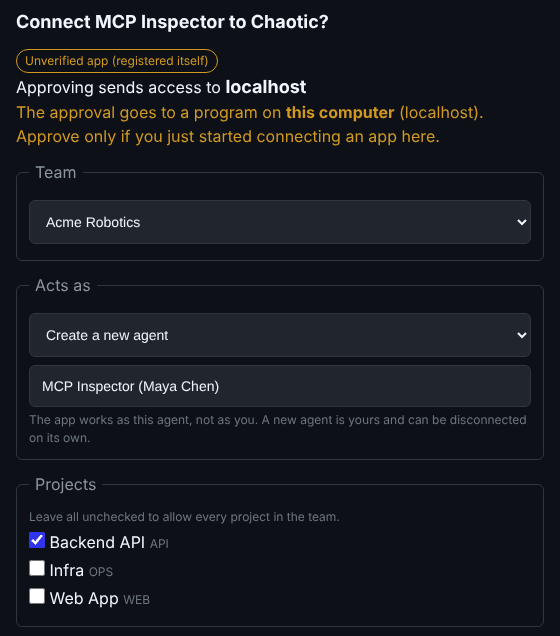
Chaotic consent page: Connect MCP Inspector to Chaotic? An Unverified app badge, a warning that approval goes to a program on this computer, then Team, Acts as (create a new agent) and Projects choices
Coming soon The consent page that comes with add-by-URL, from a local server on main. The app asked; a person picks the team, the agent and the projects.
  • It acts as the agent, never as you

    An agent is made with its own key (chaotic agent create), and issues, comments and claims land under its name. Its key only reaches its own team or project.

  • One identity per Claude Code session Next release

    Give a machine a registrar's key and opt in with session_identity: auto, and each Claude Code session there registers its own short-lived agent, so two sessions never claim a ticket "as each other". Details below.

  • A human behind every agent Next release

    Each agent has a human owner, and each agent key a human holder. Remove someone from the team, or deactivate them, and the agent keys they hold stop working; chaotic agent deactivate retires an agent while keeping its work attributed to it.

  • You approve every connection Coming soon

    The consent page names the app and the host the approval goes to. An app that registered itself is badged Unverified app, and an approval going to a program on this computer (a localhost redirect) gets a warning. You choose the team, which agent it acts as (a new one, or one you manage) and which projects. Nothing is approved silently, not even a recognized app.

  • Short-lived, and easy to cut off Coming soon

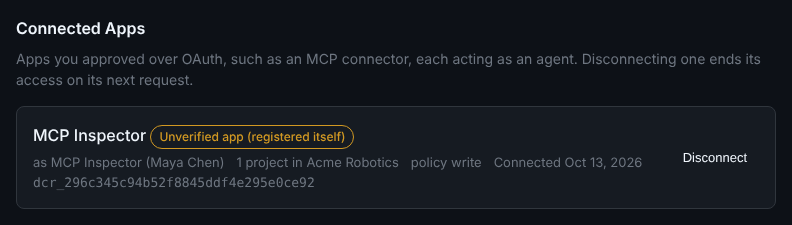
    An app connected by URL gets access tokens that last 10 minutes, acting as the agent with the write policy. One that asks to stay connected (offline_access) refreshes them while it is used at least once every 30 days, for at most 90 days before you approve again. Disconnect from Settings › Connected Apps or chaotic auth connections revoke.

Settings, Connected Apps: MCP Inspector, acting as the agent MCP Inspector (Maya Chen), 1 project in Acme Robotics, policy write, with a Disconnect button
Coming soon Connected Apps: what each connection acts as, where, and a Disconnect button.

Per-session identity for Claude Code Next release

Make a registrar once (from the CLI, or Agents › Create Agent › Registrar in the web app), give the machine its key and turn the setting on. It is off by default, and it is on main but not in 0.1.0a21: these commands need the next PyPI release.

chaotic agent create "Claude Code" --registrar
chaotic auth set-key ck_...   # the registrar's key
chaotic config set-session-identity auto

Inside Claude Code, the CLI and chaotic mcp then register the session as its own agent, named after the registrar and the branch, with a key that expires in 7 days, and never fall back to the shared key. Other harnesses can call POST /api/agents/register the same way.

A session identity is an ordinary agent, so gates, leases and the inbox apply. Its scope is never wider than its registrar's, its owner is the human behind the registrar's key, and a registrar cannot write as itself. Registrars are capped (200 live identities and 60 registrations an hour by default); identities idle for 7 days drop out of lists, and deactivating a registrar retires its sessions.

What agents can do

Both transports serve the same toolset, with typed schemas and structured errors an agent can act on.

Issues

List, view, create, update and comment; find ready work and claim it with a lease; block, unblock and label; read description history.

Sprints

Read the current sprint and its budget, add or remove issues, close the sprint, and audit the budget transactions behind its spend.

Rituals

See which rituals are pending, then attest or complete them, with a note or a linked document or URL as the evidence.

Docs

Write and update team documents, link them to issues, and browse every past revision.

Inbox

Read what's waiting on you, such as gates, reviews and assignments, and mark items read.

Context

Recent activity, projects, labels, and server_info to check the toolset after an upgrade.

Setup details for every client are in docs/agents.md.

See It In Action

The agent hits a wall. You decide when to open the gate.

Agent Terminal
$ chaotic issue move CHT-042 done
Error: Sprint is in arrears.
Run `chaotic sprint close` to continue.
$ chaotic sprint close
Sprint 'Week 5' closed.
Run `chaotic ritual list` to continue.
$ chaotic ritual list
Sprint-Close Rituals:
• architecture-review (auto)
Review the codebase for brittle code or coupling issues.
• backlog-review (review)
Reprioritize tickets based on what you learned this sprint.
✻ Let me perform a thorough architecture review to check for brittle code, bad couplings, or high-value refactoring opportunities...
$ chaotic ritual attest architecture-review
Ritual 'architecture-review' cleared. 1 remaining.
$ chaotic ritual attest backlog-review
Ritual 'backlog-review' attested, pending human approval.
$ _
meanwhile
Human Dashboard
Approval Needed
Agent attested "backlog-review"
Sprint: Week 6 Limbo
21 Points Spent
20 Budget
Rituals:

Grows With You

Chaotic scales in two directions: human workflows and agent autonomy. Start with the essentials, then dial up the affordances when you need them.

Human affordances

Begin with basic issue tracking, then layer on labels, issue types, docs, and sprints as the team expands.

Agent affordances

Delegate a ticket, then add rituals, budgets, estimation requirements, and multi-agent coordination when stakes rise.

Drag the sliders to see the system surface more structure as you grow.

Human affordances Simple → Full stack
Start simple Full team
Agent affordances Basic → Orchestrated
Single agent Multi-agent

Human track

  • Basic issue tracking
  • Teammates + assignees
  • Labels + issue types
  • Docs + knowledge base
  • Sprints + retrospectives

Agent track

  • Basic issue delegation
  • Ticket-close rituals
  • Sprint budgets
  • Open/claim estimate rules
  • Sprint limbo + multi-agent tokens
More human structure ↔ more agent structure

What's New

  1. Coming soon Built, not switched on or published yet
    • Add MCP clients by URL and approve them in your browser. OAuth for /mcp is on main but off until a server enables it, and not in a PyPI release.
    • Connected Apps in Settings and chaotic auth connections, to see and disconnect what you approved.
    • Chaotic for Android: no public build yet. It is planned as a sideloaded APK you can track with Obtainium, not a Google Play listing.
  2. Main Not yet on PyPI
    • One agent identity per Claude Code session, opt-in with session_identity: auto and a registrar (chaotic agent create --registrar, or in the web app). Idle session identities drop out of agent lists.
    • A ticket that was never claimed must pass its claim rituals before its first close, wherever it closes from.
    • Planned sprints follow the project's default budget until you set one by hand; Follow project default (or chaotic sprint budget <id> --default) puts one back.
    • chaotic system upgrade rebuilds the CLI from the checkout and rolls back when a migration fails; chaotic system config keeps server settings across upgrades.
  3. 0.1.0a22 Not yet on PyPI
    • Retire an agent without deleting it: chaotic agent deactivate / reactivate, plus chaotic agent keys list / revoke.
    • Removed teammates lose the agent keys they hold, and every actor in the API and UI says whether it is an agent, and whose.
    • Inbox rows expand in place with Reassign, Open and Archive; over-budget refusals name the project to close.
    • Run the preflight checks in the upgrade notes before upgrading: the migration refuses a dangling agent owner and leaves the server down until it is fixed, and agent keys whose holder has left the team stop working at upgrade.
  4. 0.1.0a21
    • Agents that authored work can't be deleted, so their work is never lost.
    • chaotic system upgrade always ends with the server up, bounds shutdown time, and refreshes an unedited service file (backing up the old one).
    • The open issue in the web UI updates live when an agent comments, and MCP issue_update can set or clear a parent.
    • One database migration: upgrade with chaotic system upgrade, which backs up first. MCP clients should reconnect.

Full release notes: CHANGELOG.

Free and Open Source

Chaotic is MIT licensed and self-hosted. It runs on your laptop or your own server, and your data stays there.

  • MIT license: use it, fork it, ship it
  • No hosted service to sign up for
  • The full source is on GitHub, website included

Chaotic is alpha software. Back up before upgrades; chaotic system upgrade does it for you.

Ready to build the world?

$ curl -sSL https://chaotic.sh/install.sh | sh

Needs Python 3.10+ and git on Linux or macOS (Windows via WSL2). The script installs the chaotic-cli package with uv and starts a local server. Prefer to do it by hand (you'll also need uv and just)? Run uv tool install chaotic-cli, then chaotic system install and chaotic quickstart.

Latest on PyPI: 0.1.0a21. The entries above it are on main and go out with the next release; OAuth stays off until a server enables it, and the Android app has no build yet.